
Sharing & Collaboration
Updated
Sqemo has three kinds of sharing, and they are not variations of the same thing. They differ in who gets access, what that person can do, and what they see.
| Read-only link | Invited editors | Workspace | |
|---|---|---|---|
| Who | Anyone with the URL | People you invite by email | Your team |
| Account needed | No | Yes | Yes |
| They can | View the diagram | Co-edit in realtime | Share one naming standard |
| Scope | One diagram | One diagram | Every connected ERD |
| Good for | Review, docs, stakeholders | Building the model together | Consistency across projects |
All three require the ERD to be saved to the server first — the Server menu in the toolbar. Local browser projects cannot be shared.
Share a read-only link
Open Server → Share link and create a link. Anyone with the URL can open the diagram, switch between the logical and physical views, and read it — without signing in or installing anything.
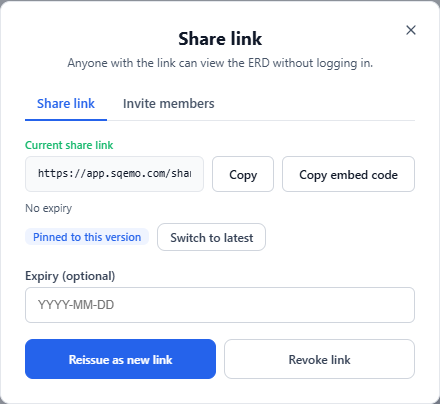
Two things are worth knowing before you send one out:
- The link is pinned to the version you shared. Sqemo snapshots the diagram at the moment you create the link, so later edits do not leak into a review that is already in progress. Use Switch to latest when you want the link to always show current work.
- An expiry date is optional. Leave it empty for a link that does not expire; set one for an external review that should go stale on its own.
You can revoke a link at any time, or Reissue as new link — a diagram holds one active link, so reissuing invalidates the old URL. Only the ERD owner manages share links; the server rejects the call from anyone else.
Embed a diagram
The same dialog has Copy embed code, which gives you an <iframe>
snippet for a wiki, a README preview, or an internal docs page:
<iframe src="https://app.sqemo.com/embed/YOUR_TOKEN" width="100%"
  height="480" style="border:1px solid #d0d0d0;border-radius:8px"
  loading="lazy" allowfullscreen></iframe>
The embed is a chrome-less viewer — canvas only, no sidebar or toolbar. Two query parameters tune it to the page it lives on:
?view=physical— open on the physical model instead of the logical one.?theme=lightor?theme=dark— match the host document. The default follows the reader’s system setting.
Expiry and version pinning work exactly as they do for a shared link, because an embed is a shared link in a frame.
Invite editors for realtime co-editing
Open Server → Share link → Invite members and enter an email address. The person does not need a Sqemo account yet — they will see an invitation banner after signing up with that address. Accepting requires a verified email.
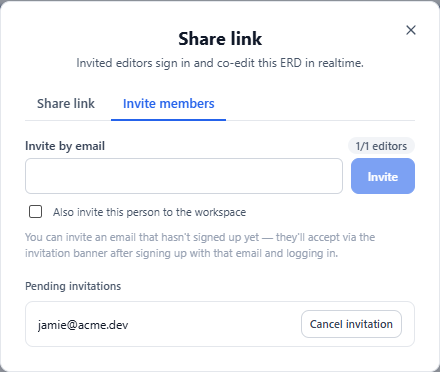
Once they join, editing is realtime: you see who is connected, entities someone else is editing are softly locked to prevent collisions, and concurrent changes are merged on save.
How many editors you can invite depends on your plan — 1 on Free, 3 on Pro, and unlimited within your team on Team. On Team, teammates who hold a seat are never counted; only guests from outside the workspace count, and they get the Pro allowance of 3 per diagram on top of your teammates. Regardless of plan, a single diagram holds at most 50 editors; that is an anti-abuse guard, not a plan limit. See pricing for the full comparison.
An ERD has exactly one owner. You can transfer ownership to another editor, which is the supported way to hand a model over when someone leaves a project. Editors who no longer need a diagram can leave it from the Shared ERDs list in the sidebar.
Workspaces and the team standard
A workspace is a different axis of sharing: instead of one diagram, it holds the team standard — the word list, naming rules, and standard domains that every connected ERD generates physical names from. See Naming standards for how generation works.
Members do not edit the standard directly. They propose new words, either in the app or through an AI agent; the standard owner approves or rejects; approved words propagate to every connected project. While an ERD is connected to a standard, its Naming and Domains panels are read-only — the proposal queue is the way in. That is the point: a standard that anyone can quietly edit is not a standard.
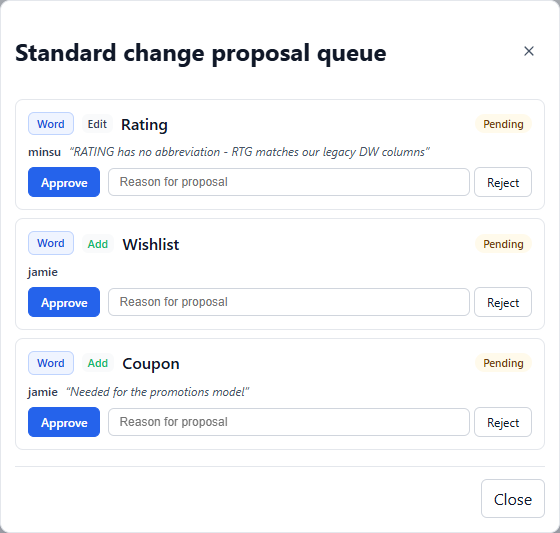
Workspace ownership can be transferred, same as an ERD. On Free a workspace holds 2 members including the owner, which is enough to try the workflow with one teammate.
Compliance view
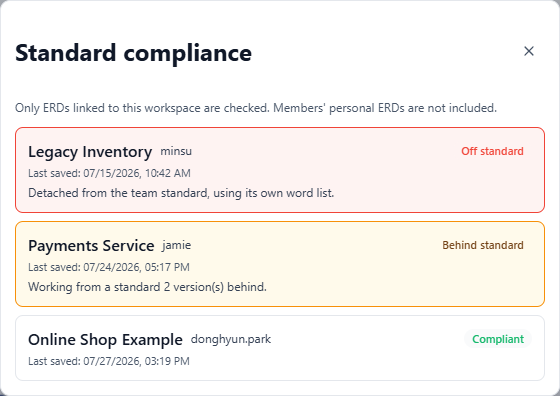
Teams get a compliance view listing every connected ERD and flagging the two ways a project drifts: detached (no longer connected to the standard at all) and behind (connected, but lagging the latest version of the standard). It is the difference between having a standard and knowing it is followed.
Snapshots, diff, and pinned links
Server ERDs keep snapshots you can restore and compare. Diff two versions to see exactly what changed before a review — or compare any snapshot against the current server state.
On a shared ERD, once someone other than you has saved a version, every row shows who saved it (the local part of their email), so a review can tell an editor’s checkpoint from the owner’s. Versions saved before this feature shipped show — instead of a name.
The server ERD list and the ★ Latest row in version history also show who last saved the server copy, so a plain save without a snapshot is still attributable.
One interaction to keep in mind: if a share link is pinned to a snapshot and you delete that snapshot, the link does not break — it falls back to following the latest version. Sqemo warns you before the deletion, but if the link was pinned deliberately for an audit or a review, reissue it afterwards.
Who can do what
| Link viewer | Invited editor | ERD owner | |
|---|---|---|---|
| View the diagram | Yes | Yes | Yes |
| Edit and save | No | Yes | Yes |
| Manage share links | No | No | Yes |
| Invite or remove editors | No | No | Yes |
| Transfer ownership | No | No | Yes |
| Delete the ERD | No | No | Yes |
Within a workspace, the same split applies to the standard: members propose, the workspace owner approves and manages membership.