
Reverse-Engineering a Word List From an Existing Database: What I Asked the AI After Importing the SQL
· Updated
Far more organizations inherit a system that was built without a standard than start a standardization project from scratch. What you have is twenty CREATE TABLE scripts, column names that are chains of abbreviations — user_sn, aprv_stcd, last_aprv_asgn_rt — and no document that says which word each abbreviation stands for.
The usual advice is “don’t start from a blank sheet, reverse-engineer the current schema.” This post is a record of actually doing that. I imported the MySQL DDL of an internal business system (20 tables, about 400 columns) into Sqemo, connected an AI coding agent to the Sqemo MCP server, and typed these four sentences in order. I happened to use Claude Code, but MCP is a standard protocol — Codex, Gemini CLI, Cursor, or any MCP-capable agent does the same thing with the same setup. These four sentences are everything a human typed; the rest is what the AI read from the ERD and wrote back.
- List the ERDs on the server.
- Infer the domains for “test import” and create them.
- Infer the word list too and create it.
- Infer which domain each column in the ERD belongs to and register it.
(I didn’t ask for verification. The AI did that on its own.)
Below is what the AI did at each step and, more importantly, where it stopped and asked for a human decision. The point isn’t that it took thirty minutes; the point is where that boundary fell. For anyone doing this for the first time, the setup steps (0-1 to 0-3) include the exact screens and commands. If your agent is already connected, skip to step 1.
One thing worth saying up front: the whole time, I had the same ERD open in app.sqemo.com. Every time the AI saved through MCP, the word list panel and the domain list in the browser tab updated in place (if you have no unsaved edits, the tab switches to the latest version and shows a toast). I was watching the terminal’s work happen on screen, so I never had to refresh to see what the AI had registered.
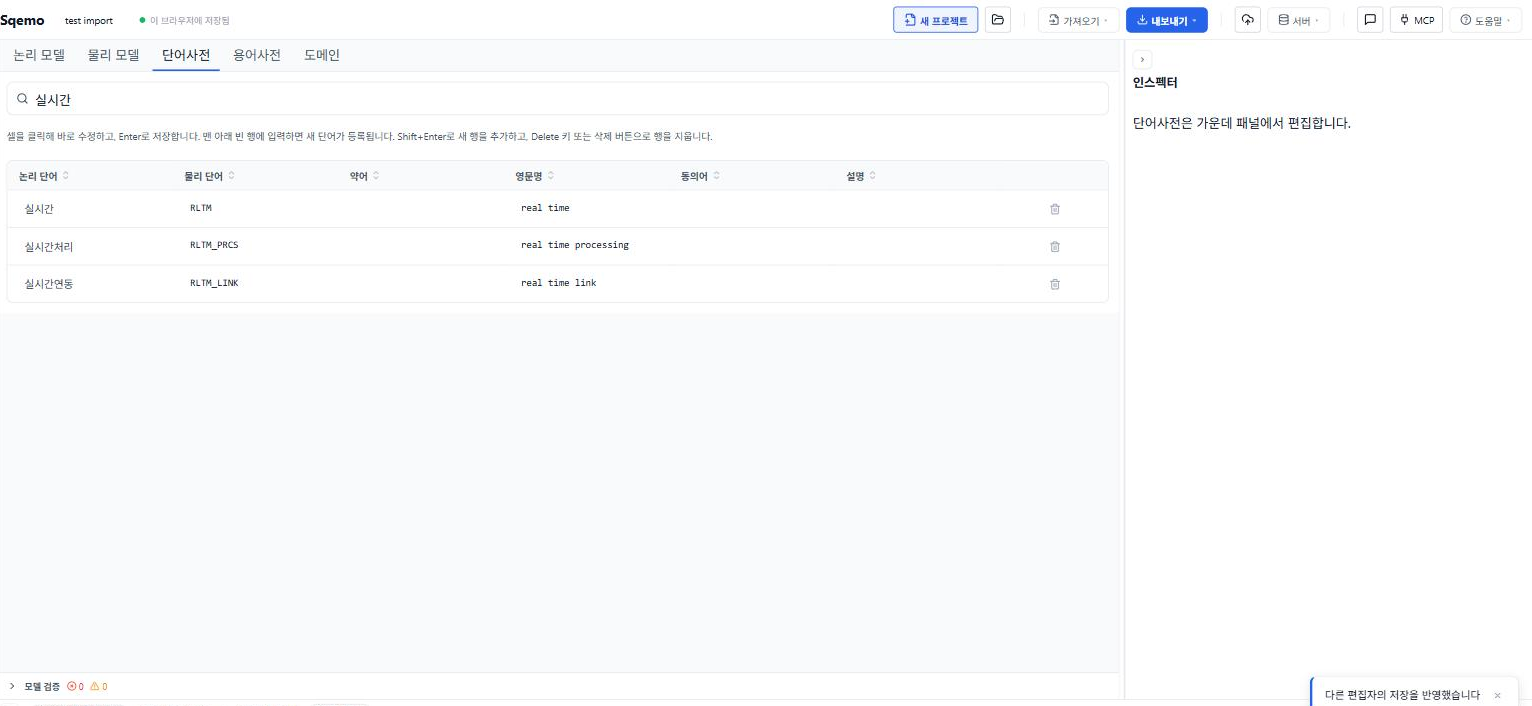
A note on the data: this schema’s logical names are Korean, because the DDL’s COMMENT clauses were written in Korean. The mechanics below don’t depend on the language — a word list maps a logical word to a physical abbreviation, and the alignment is the same whether the word is “customer” or “고객”. I’ve glossed each Korean word in English where it matters.
0. Setup — three things, done once
0-1. Import the SQL
Open app.sqemo.com and choose Import → Import SQL in the top bar. The “Import SQL” button on the welcome screen goes to the same place. Pick a .sql file or paste the CREATE TABLE statements. Entities, attributes, and relationships are built from the DDL, and even without FK constraints, a column ending in _sn or _id whose name matches another table’s PK is inferred as an identifying relationship. The dialect (MySQL, PostgreSQL, Oracle, CUBRID) is detected automatically and can be changed in the import dialog.
This schema had logical names in the DDL COMMENTs, so entities like “User Base” and attributes like “User Serial Number” came in with their logical names filled. If your system has no COMMENTs, filling in logical names is the first manual step — everything below needs a logical name sitting next to each physical name.
The imported ERD has to be saved to the server for the AI to read it (save after signing in and it becomes a server ERD). I named it “test import”.
0-2. Connect the Sqemo MCP server to your agent
Node.js 22 or later is required. Pick the one that matches your agent.
Claude Code — create .mcp.json in the project root:
{
  "mcpServers": {
    "sqemo": { "command": "npx", "args": ["-y", "sqemo-mcp"] }
  }
}
Codex CLI — one command:
codex mcp add sqemo -- npx -y sqemo-mcpCursor, Claude Desktop, and others — put the same mcpServers JSON in the tool’s MCP config file. Paths are in the MCP docs.
If editing config files by hand is a chore, hand the agent the URL https://sqemo.com/docs/mcp/ and say “connect this MCP server.” It finds its own config file and writes it.
0-3. Sign in — once, in the terminal
Local .erd.json files need no login, but for the AI to read and write an ERD saved on the server, you sign in once. In a terminal:
npx sqemo-mcp loginIt asks:
How do you want to sign in?
  1) Google           (opens your browser)
  2) GitHub           (opens your browser)
  3) Email + password (right here)

Choice [1]: 1
Opening your browser to sign in with google.
If it does not open, paste this URL into your browser:
  https://…/auth/v1/authorize?provider=google&redirect_to=http%3A%2F%2F127.0.0.1%3A…%2Fcallback&…
Waiting for the sign-in to complete... (Ctrl+C to cancel) ...
Logged in: you@example.com
Choose 1 or 2, approve with the Google/GitHub account you use for the app, and you’re back in the terminal. On a headless server, use option 3 or npx sqemo-mcp login --password. Only a refresh token is stored (~/.erdmaker/credentials.json), never the password. npx sqemo-mcp logout ends it.
One caveat — this command has to be run directly in a terminal. Running it from inside the agent (with a ! prefix or similar) fails with Login failed: missing email or phone because stdin is closed. I did exactly that the first time.
That’s the setup. From here on, you just talk to the agent.
1. “List the ERDs on the server”
I said this before signing in, and got:
not_authenticated: Login required. Run `npx sqemo-mcp login` in a terminalAfter step 0-3, the same sentence returned six ERDs as a table — name, owner/editor role, shared or not, last modified. “test import” was at the top.
| Name | Role | Shared | Last modified |
|---|---|---|---|
| test import | owner | – | just now |
| Online Shop Example | owner | ✓ | 3 hours ago |
| … |
All the AI did here was call list_erds once. But that one call lets every later request mean “that ERD.” No file attachments, no pasting schemas.
2. “Infer the domains for test import and create them”
The AI first read the ERD overview — 20 entities, 17 relationships, 0 domains, 0 words. Then it pulled every attribute across the 20 entities (about 400) and counted pairs of last word of the attribute name (the class word) and data type. A domain is the rule “attributes of the same kind get the same type,” so reverse engineering starts from that tally.
| Class word | Type | Examples |
|---|---|---|
| serial number (일련번호) | BIGINT | user_sn, group_sn, menu_sn |
| flag (여부) | CHAR(1) | del_yn, use_yn, eml_noti_yn |
| code (코드) | VARCHAR(4) | user_tpcd, aprv_stcd, ctrt_secd |
| datetime (일시) | DATETIME | reg_dt, mdfcn_dt, last_cntn_dt |
| date (일자) | VARCHAR(8) | use_term_ymd, stpl_ymd |
| name (명) | VARCHAR(200) | user_nm, inst_eng_nm, pic_nm |
| amount (금액) | BIGINT | ctrt_bgt_kcur_amt, rtrvl_usd_amt |
| rate (비율) | NUMERIC(12,3) | last_aprv_asgn_rt |
| exchange rate (환율) | NUMERIC(9,4) | aplcn_usd_exchrt |
From this tally the AI registered 28 domains with upsert_domain. No human transcribed a table.
It also returned what it didn’t register, and that list is the real output of this step: the cases where the class word is the same but the type splits.
- “name” is
VARCHAR(200)almost everywhere, but three attributes — group name, institution name, contract English name — areVARCHAR(500). The AI split them intoname (200)andlong name (500). Whether an institution name really needs 500 characters or someone just picked a generous number is something the schema can’t answer. A human has to look. - “description” is mostly
VARCHAR(300), but group description is 2000 and contract description is 4000. 4000 matches the existingcontentdomain, so it went there; 2000 was left as an exception. - “code” is
VARCHAR(4)as the standard, but institution code is 5 characters and country code is ISO 2. These are not exceptions — they’re separate domains. The institution code system and the country code system are different things.
What reverse engineering gives you is “this is how it’s used today.” Which of that is the standard and which is a mistake is decided by the business, not by statistics. The AI took the majority as the standard, returned the minority as exceptions, and left the three calls to a person.
3. “Infer the word list too and create it”
If domains look at one class word, the word list splits the whole logical name into words and aligns them with the tokens of the physical name.
contract | enforcing | institution | English | name
ctrt     | enfrc     | inst        | eng     | nm
The AI ran this alignment over the 400 attributes it had already read, extracted about 200 words, and registered 204 with upsert_dictionary_word — logical word, physical abbreviation, English name (user → user, authority → authrt, assignment → asgn, collaboration → clbr). This schema had been built against a public-sector standard word list, so the same word always produced the same abbreviation, and it went through in one pass. On a system built without a standard, this is where NUM, NBR, and NO show up side by side — and that list is the raw material for synonym cleanup.
A side note: at the time, the AI called the single-word registration tool 204 times, and since one single-item write is four server calls (read, permission check, write, notify), some calls hit the MCP per-minute request limit (120) and were rejected. Registration is an upsert keyed by logical word, so resending only the rejected ones fixed it without duplicates. But while writing this post I added bulk tools — upsert_dictionary_words and upsert_domains (2.7.0), and upsert_attributes (2.8.0) for step 4 below. The same task today is one call for all 204 words, and the three reverse-engineering steps in this post are three calls total.
Even on a well-aligned schema there were three decision points, and the AI reported how it handled each.
One: the same word abbreviated differently depending on position. “Detail” (내역) is ls at the end of a table name (tc_user_add_authrt_dept_ls) but dsctn inside an attribute name (dsctn_ctrt_korn_nm, detail contract Korean name). “History” (이력) is hs in tables, hstry in attributes. A word list has one abbreviation per word, so one had to be chosen; the AI registered the entity-side one (ls) as canonical and added “detail contract” as a separate compound word dsctn_ctrt. That copies this system’s convention into the dictionary — it isn’t the right answer. On a new system you’d unify from the start.
Two: two words fused into one abbreviation. “Type code” is tpcd, not tp_cd; “status code” is stcd; “category code” is secd. These are old habits of the public-sector standard, and they have to go in as compound words (“type code → tpcd”) for generated physical names to match the real columns. The principle that matching the field’s actual notation beats the consistency of the generation rule applied here as-is.
Three: columns with no logical name. 13 of the 400 had no COMMENT, so the logical name was just the physical name — last_pwd_chng_dt, tmp_pwd_yn, sp_nd_yn, columns that look like later additions. The dictionary can’t resolve these. Only the person who wrote sp_nd knows what it abbreviates. Reverse engineering structures what was documented; it can’t invent what wasn’t. The AI returned the 13 as a list and said “tell me the logical names if you want them filled in.”
4. “Infer which domain each column belongs to and register it”
Having created domains is not the same as attributes using them. Only once they’re linked does changing a domain’s type carry 400 attributes with it, and does typing “flag” on a new attribute pick up CHAR(1) automatically. So the last step was to link each attribute to its domain.
The rule the AI set itself was two lines: link only when the domain name is a suffix of the logical name AND the data type exactly matches the domain. The second condition matters. In Sqemo, attaching a domain to an attribute changes the attribute’s type to the domain’s. Attach name (VARCHAR(200)) to group name VARCHAR(500) and the column shrinks to 200 characters — that’s a schema change, not reverse engineering. Attributes with a different type are correctly left unlinked and returned as a list.
The result was 378 of 407 attributes linked.
| Link | Count | Note |
|---|---|---|
| Suffix and type match | 373 | flag 65, code 53, datetime 43, ID 41, name 36, serial number 29, amount 15, date 15 … |
| Linked to a variant domain of the suffix | 5 | group name, institution name, contract English name (VARCHAR 500) → long name. The domain split in step 2 got used here |
| Unlinked, type mismatch | 16 | contract description 4000 vs description 300, certificate DN value 300 vs value 100, an 11-character external code vs the 5-character institution code system, etc. |
| No logical name | 13 | The 13 from step 3 — no suffix to read, so they drop out here too |
The 16 unlinked ones are this step’s output. Should contract description attach to content rather than description? Should the 11-character external institution code become its own domain? The three decisions left open at the domain step showed up as 16 concrete cases at the attribute step. There was one to filter out, too: department fax number got attached to phone number (VARCHAR 256), a variant of the “number” suffix. The type matches, but whether a fax belongs in the phone number domain is a human call.
If you’re watching the browser tab during this, you see domain names filling in next to attributes one by one. This was a per-attribute call, so 378 saves happened over about ten minutes (single-item tools read and write the project on every call) — which is why the bulk upsert_attributes tool exists now. Today, 378 links are one save.
5. Verification — does the dictionary regenerate the real column names?
There is one way to check that the dictionary and domains are right: generate the physical name from the logical name and compare with the real column. I didn’t ask, but the AI ran this check (check_naming) on its own, and the first result was a mismatch:
last approval assignment rate → LAST_APRV_ASGN_RT (actual: last_aprv_asgn_rt)The word split was exact; the case was wrong. The naming rules were still at the default (uppercase). The AI changed the rules to match this system — lowercase, _ separator, self-reference prefix “up” — and ran the check again.
| Logical name | Generated physical name | Actual column | Match |
|---|---|---|---|
| last approval assignment rate | last_aprv_asgn_rt | last_aprv_asgn_rt | ✅ |
| contract enforcing institution English name | ctrt_enfrc_inst_eng_nm | ctrt_enfrc_inst_eng_nm | ✅ |
| parent menu serial number | up_menu_sn | up_menu_sn | ✅ |
| user additional authority department detail | user_add_authrt_dept_ls | tc_user_add_authrt_dept_ls | prefix only |
The last row is the one remaining decision. The table prefixes tc_ (common) and tb_ (business) mark subject areas, and a word list deals in words, not subject areas, so it can’t express them. That belongs in the naming rules — the “should we use prefixes” question from the naming conventions post showing up as a concrete case.
What passing verification means is precise. From now on, when someone adds a new table to this system, they write the logical name and the physical name comes out under the same rules as the existing 400, and using a word that isn’t in the dictionary raises a warning on the spot. That’s the point where the reverse-engineered standard stops being a document and starts working as a rule.
What was automatic and what was human
| What the AI did | What a person does |
|---|---|
| Read the ERD list, overview, and 400 attributes | Sign in once |
| Tally class words and types → register 28 domains | 3 split-type cases: exception or separate domain? |
| Align logical–physical tokens → register 204 words | 2 positional abbreviation conflicts: is the canonical one right? |
Identify compound words (tpcd etc.) | Recover the meaning of 13 columns with no logical name |
| Link 378 of 407 attributes to domains | 16 type mismatches: change the domain or keep as exception? (+ review 1 fax number) |
| Set naming rules and compare generated vs. actual | Decide the table prefix rule |
Four sentences typed; decisions left over: 3 domains, 2 abbreviations, 16 unlinked, 13 unnamed — all received as lists. Reading 400 columns and turning them into tables was the AI’s job. Looking at the exceptions that fell out of those tables and ruling “this is the standard, this is a mistake, this is a separate thing” stayed with the human. In standardization work, the first part is what eats the time and the second is where the value is. Swapping that order is what changed most in this exercise.
To try it
SQL import, the word list, domains, and naming rules are free in Sqemo and work on local files with no sign-up. The AI part connects through the MCP server (npx sqemo-mcp) to any agent that supports MCP — Claude Code, Codex, Gemini CLI, Cursor — and only that part needs a login, because it reads and writes server ERDs. Without MCP, the same result comes from exporting the imported attributes as CSV, pasting them to an AI, and importing the returned words as a dictionary CSV (logicalWord, physicalWord, englishName, …) — except that you run the verification step yourself.
One last thing — the product of reverse engineering is not the dictionary. It’s the exception list. The fact that 204 words got registered says less about the system than the 3 split types, the 2 split abbreviations, the 16 columns that wouldn’t attach, and the 13 whose meaning nobody wrote down. Starting standardization with that list in hand is a different job from starting with a blank sheet.
Frequently asked questions
- Can you build a database naming standard from an existing schema?
- Partly. An existing schema tells you how names are used today — which suffixes map to which types, which abbreviations stand for which words. Counting those patterns gives you a draft word list and a draft set of domains. What it cannot tell you is which minority patterns are mistakes and which are deliberate; that is a business decision, and reverse engineering hands it to you as a short exception list.
- How do you extract a data dictionary from SQL DDL?
- Import the CREATE TABLE statements into an ERD so that each column has a logical name (from COMMENT clauses) next to its physical name, then align the two token by token: customer → cust, number → no. Each aligned pair is a dictionary entry. Columns without a logical name cannot be aligned and stay as a to-do list.
- Do I need the MCP server to do this?
- No. The same result comes from exporting the imported attributes as CSV, pasting them to any AI model, and importing the returned word list as a dictionary CSV. The MCP server (npx sqemo-mcp) removes the copy-paste and lets the agent write directly into the ERD, but the verification step — regenerating physical names from logical names and comparing with the real columns — is what you must not skip either way.
- Is this free?
- SQL import, the word list, domains, and naming rules are free in Sqemo with no sign-up for local files. Reading and writing an ERD saved on the server through the MCP server needs a free account and one terminal login.